Microsoft Surface 3
Ausstattung / Datenblatt
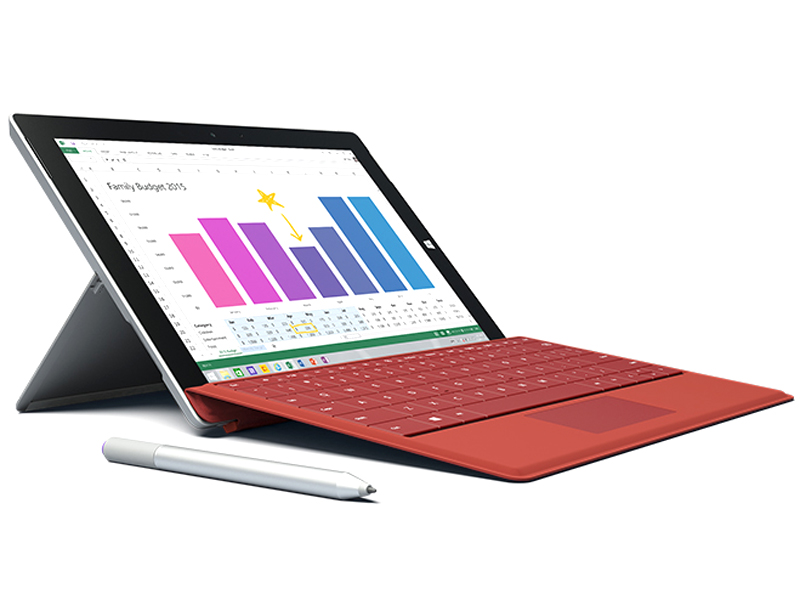
Primary Camera: 8 MPix
Secondary Camera: 3.5 MPix
Preisvergleich
Durchschnitt von 40 Bewertungen (aus 60 Tests)
Testberichte für das Microsoft Surface 3
"Notebook-Killer" Vol. 3 - Nach dem Surface 3 Pro im Herbst des vergangenen Jahres bringt Microsoft nun auch die Light-Variante in Form des Surface 3 auf den Markt. Wir haben ein Gerät im Test und teilen hier fortlaufend unsere Ergebnisse. Update 12.05.2015: Spieleperformance
Quelle: Telecom Handel - Heft 13/2015

Das Surface 3 ist vor allem für den Business-Bereich interessant, da es mit einem vollwertigen Windows arbeitet. Die Hardware setzt aber keine neuen Maßstäbe, was angesichts des hohen Kaufpreises etwas schade ist.
Einzeltest, online nicht verfügbar, Länge unbekannt, Datum: 01.07.2015
Bewertung: Gesamt: 80%
Quelle: Allround-PC.com
Archive.org versionMit dem Surface 3 liefert Microsoft erneut ein sehr ansehnliches und hochwertig wirkendes Tablet ab. Kleine Änderungen im Design, wie die gelungene Umverteilung von Anschlüssen und Knöpfen und der nun dreistufig verstellbare Standfuß, tragen zum guten Gesamteindruck des Surface 3 bei. Das Display eignet sich durch eine hohe Blickwinkelstabilität und eine anständige Helligkeit sehr gut zum Einsatz im Freien.
Einzeltest, online verfügbar, Lang, Datum: 17.06.2015
Quelle: MobiFlip
Archive.org versionEs macht langsam keinen Spaß mehr, das zu schreiben: Trotz aller Detailverbesserungen bleibt das Surface 3 ein Tablet/Laptop Hybrid, der nur für eine kleine Nische an Nutzern überhaupt interessant ist. Am interessantesten könnte das Surface 3 noch für Schüler oder Studenten sein.
Einzeltest, online verfügbar, Lang, Datum: 17.06.2015
Quelle: c't - 15-06-2015
Das Surface 3 ist kein iPad-Killer und das ist eine gute Sache. Es ist kein Tablet, mit dem man ausnahmsweise arbeiten kann, sondern ein Arbeitsgerät, das ab und an auf der Couch unterhält. ... Das 3:2-Display ist für den Windows-Desktop eine sinnvolle Wahl
Einzeltest, online nicht verfügbar, Länge unbekannt, Datum: 15.06.2015
Quelle: Gamestar
Archive.org versionMit dem Surface 3 im Test hat Microsoft ein hochwertiges Tablet abgeliefert. Das war angesichts der Vorgänger nicht anders zu erwarten, neu ist schließlich nur der Umstieg von ARM auf x86 und von Windows RT zu Windows 8.1 (mit Option auf Windows 10, wenn es erschienen ist). Und genau diese Neuheiten machen aus der ehemals bei den Käufern eher unbeliebten RT-Serie ein universell nutzbares Modell mit voller Anwendungskompatibilität.
Einzeltest, online verfügbar, Lang, Datum: 05.06.2015
Bewertung: Gesamt: 83% Leistung: 70% Ausstattung: 85% Bildschirm: 90% Ergonomie: 80%
Quelle: Computerbild - Heft 12/2015
Das neue Surface 3 ist wirklich gelungen – die Verarbeitung ist top, sein Display überzeugt. Und auch die Ausstattung kann sich sehen lassen: Dank vollwertigem USB-3.0-Anschluss können USB-Sticks und externe Festplatten andocken, per Mini-DisplayPort auch ein großer Bildschirm. Größtes Manko? Die sehr knappe Akkulaufzeit.
Einzeltest, online nicht verfügbar, Länge unbekannt, Datum: 01.06.2015
Bewertung: Gesamt: 89%
Quelle: Pocket Navigation
Archive.org versionDas Surface 3 ist ein tolles Stück Technik. Design, Verarbeitung, das Display und auch die Performance können mich als Casual User absolut überzeugen. Geht es über den normalen Anwendungsbereich hinaus, beispielsweise mit einer Videobearbeitung, dann kommt das Gerät stellenweise an seine Grenzen. Dennoch bin ich insgesamt mit dem neusten Tablet von Microsoft zufrieden.
Einzeltest, online verfügbar, Lang, Datum: 30.05.2015
Quelle: Tom's Hardware
Archive.org versionDamit stellt sich allerdings die Frage, auf welche Kundschaft das Surface 3 treffen soll. Private Nutzer können sich für 870 Euro schon fast einen ganzen Gerätepark zusammensuchen - wenn sie die entsprechenden Abstriche in Kauf nehmen. Und selbst bei höheren Ansprüchen finden sich Flachrechner, die zu einem günstigeren Preis ebenso gute Dienste leisten.
Einzeltest, online verfügbar, Lang, Datum: 27.05.2015
Quelle: Tabtech
Archive.org versionBetrachtet man den Preis nicht, ist das Surface 3 ein verdammt geniales Tablet mit gutem Display, guter Verarbeitung, praktischem Kickstand und gutem Stylus. Bei der Performance muss man sich nichts vormachen – ein Intel ATOM bleibt ein Intel ATOM und große Sprünge darf man sich zwischen der älteren und der neuesten Generation nicht erwarten.
Einzeltest, online verfügbar, Lang, Datum: 26.05.2015
Bewertung: Gesamt: 85% Preis: 60% Leistung: 70% Bildschirm: 100% Mobilität: 80% Gehäuse: 100%
Quelle: Netzwelt
Archive.org versionAuch wenn das Surface 3 wohl kaum ein Notebook vollständig ersetzen kann: Es ist das leichteste und damit mobilste Modell der Surface-Reihe, ist sehr gut verarbeitet und bietet ein vollwertiges Windows 8.1-OS. Unter den Tablet-PCs mit Tastatur kann es sich damit fast mühelos an die Spitze setzen.
Einzeltest, online verfügbar, Lang, Datum: 10.05.2015
Bewertung: Gesamt: 85% Leistung: 50% Ausstattung: 80% Bildschirm: 90%
Quelle: Notebookinfo
Archive.org versionDas Microsoft Surface 3 ist zweifelsohne ein tolles Tablet, welches als erstes Gerät außerhalb der Surface Pro Reihe alle Versprechen in Sachen Benutzerfreundlichkeit und Produktivität auch hält. Mit dem Type Cover kann überraschend treffsicher getippt werden, der Touchscreen funktioniert komfortabel und der N-Trig Stift befördert das Surface 3 endgültig aus der konventionellen Tablet-Liga.
Einzeltest, online verfügbar, Lang, Datum: 10.05.2015
Bewertung: Gesamt: 96% Leistung: 95% Bildschirm: 95% Mobilität: 90% Gehäuse: 100% Ergonomie: 100% Emissionen: 95%
Quelle: Stiftung Warentest - Heft 6/2015
Das Microsoft Surface 3 ist ein gutes Windows-Tablet, das gut verarbeitet ist. Es lässt sich dank integriertem Standfuß in drei verschiedenen Positionen aufstellen. Sein großes Display bietet eine hohe Auflösung (1920 x 1280 Pixel), ist sehr hell und insgesamt gut – es bietet einen sehr guten Betrachtungswinkel. Der Prozessor hat 4 Kerne. Der freie interne Speicher beträgt 36,8 Gigabyte und kann mit bis zu 128 Gigabyte erweitert werden. Das Tablet eignet sich gut zum Surfen im Internet, für E-Mail, zum Musikhören und für Büroanwendungen und sehr gut für 3D-Spiele und zum Ansehen von Fotos und Videos. Der Akku ist befriedigend. Das Gerät hat kein Mobilfunkmodem, ist also auf einen WLan-Zugang angewiesen um ins Internet zu gehen. Es hat keinen GPS-Empfänger. Das Surface verfügt über zwei Kameras, die Rückkamera (für Fotos) hat 8 Megapixel und ist gut. Der Klang der Lautsprecher ist gut.
Einzeltest, online nicht verfügbar, Länge unbekannt, Datum: 01.05.2015
Bewertung: Gesamt: 88%
Quelle: Computerbild - Heft 09/2015
Das Surface 3 spielt seine Rolle als Anti-iPad gut: Es ist eins der handlichsten Tablets, die auch als PC taugen. Interessant ist es für alle, die mit ihrem Tablet mehr als nur ‚Angry Birds‘ spielen wollen. Alle anderen sind mit einem iPad oder Android besser bedient.
Einzeltest, online verfügbar, Länge unbekannt, Datum: 16.04.2015
Quelle: e-media - Heft 09/2015
Das Surface 3 hat ein ganz klares Anwendungsgebiet: das bequeme Arbeiten unterwegs dank verbesserter Hardware und Windows 8.1. Dennoch ist es mehr als Tablet denn als vollwertiger Notebook-Ersatz positioniert. Wer schon einen leistungsstarken Rechner hat und eine mobile Ergänzung sucht, wird damit sehr viel anfangen können. Problematisch ist der auch ohne Zubehör relativ hohe Basis-Preis.
Einzeltest, online nicht verfügbar, Länge unbekannt, Datum: 16.04.2015
Bewertung: Gesamt: 80%
Quelle: Android Welt - Heft 5/2015
Mit dem tollen Display, dem für Alltagsaufgaben absolut ausreichenden Prozessor und dem starken Akku präsentiert sich das Surface 3 von Microsoft im Test als.
Einzeltest, online nicht verfügbar, Länge unbekannt, Datum: 01.04.2015
Bewertung: Gesamt: 85%
Ausländische Testberichte
Quelle: It Pro
 EN→DE Archive.org version
The Surface Pro 3 is a significant improvement over its predecessors, which were three-star products. We love the design, the pen input is superb and we can't fault the quality of the display. Unfortunately, software doesn’t allow you to get the best out of the screen and battery life is sub-par when contrasted with standalone tablets.
Einzeltest, online verfügbar, Lang, Datum: 28.07.2016
Bewertung: Gesamt: 80%
Quelle: Tech Advisor
EN→DE Archive.org versionWhen we reviewed the Surface Pro 3 - almost a year ago - we concluded that it was the best yet. It's the most portable of laptops and an acceptable tablet. Nothing has changed with the update to Windows 10. The Surface Pro 4 is an evolution and, apart from the higher screen resolution and new chips, doesn't offer too many compelling reasons to buy one over the cheaper Pro 3, or upgrade if you already have one. With the iPad Pro, it's the best yet in some ways - it's the most powerful iPad and has the highest resolution screen - but it may not be the best choice for everyone who wants an iPad.
Vergleich, online verfügbar, Sehr kurz, Datum: 19.10.2015
Quelle: Zdnet.com
EN→DE Archive.org versionThe Surface 3 with the Type Cover is a world class laptop and stellar tablet. It can easily replace a laptop with few, if any, compromises. It is a tremendous value for the relatively low base price. This is the best purchase I've made this year.
Einzeltest, online verfügbar, Sehr kurz, Datum: 11.08.2015
Quelle: Ultrabook Review
EN→DE Archive.org versionI've been using the base model of the Surface 3 as my daily driver for the past 3 months. It's beautifully crafted, decent to type on, and won't break the bank. However, the Surface 3, and especially the most basic model, has a few shortfalls.
Einzeltest, online verfügbar, Mittel, Datum: 18.07.2015
Bewertung: Gesamt: 70%
Quelle: T3
EN→DE Archive.org versionThe Surface 3 is a worthy addition to Microsoft's tablet line that would make a good second device for most people. From its impressive display to its handy Surface Pen and classy design, there's a lot to like. It's powerful enough to carry out basic tasks, and it could chew through more demanding ones too - just don't expect it to do them very quickly.
Einzeltest, online verfügbar, Kurz, Datum: 16.07.2015
Bewertung: Gesamt: 80%
Quelle: Techspot
EN→DE Archive.org versionThe full metal body of the Surface 3 makes it one of the best designed, most attractive Windows tablets on the market. Throw in great features like the three-position kickstand, the hidden microSD card slot, the full-sized USB port, the 3:2 display, and Microsoft has nailed the design of this tablet.
Vergleich, online verfügbar, Sehr Lang, Datum: 06.07.2015
Bewertung: Gesamt: 75%
Quelle: Hot Hardware
EN→DE Archive.org versionMicrosoft's Surface 3 is a tough one to judge. For starters, the operating system onboard at the time of this review won't be the one that most buyers see. In a few weeks, Windows 10 will make its debut, sliding right atop Windows 8.1 as a free upgrade. We anticipate that the user experience will get a bit better, but major system updates generally eat up additional system resources as well.
Einzeltest, online verfügbar, Lang, Datum: 19.06.2015
Quelle: Tested
EN→DE Archive.org versionWe loved using the Surface Pro 3 as a primary laptop, though it was a little too big to use with the stylus as a portable digital notepad. The new Surface 3, though, hits a lot of sweet spots for power and portability. We sit down to discuss its use of Intel's latest Atom processor, the new form factor, and how it stacks up against dedicated laptops and tablets.
video review
Einzeltest, online verfügbar, Sehr kurz, Datum: 17.06.2015
Quelle: Digital Versus
EN→DE Archive.org versionWith the success of the Surface Pro 3, Microsoft is bringing out a 'non-pro' version. The Surface 3 is a well-built convertible laptop-tablet that, when coupled with the (sadly expensive) optional keyboard, makes for a great user experience, provided s/he sticks to simple tasks (Office, internet browsing and light photo touch-ups).
Einzeltest, online verfügbar, Kurz, Datum: 12.06.2015
Bewertung: Gesamt: 60% Leistung: 20% Bildschirm: 100% Mobilität: 80%
Quelle: Comp Reviews
EN→DE Archive.org versionMicrosoft's Surface 3 tablet may have come out wuite late compared to the pro model but it is a good step forward for those wanting a function and well built Windows tablet. The performance may be a bit limited but it offers some surprising features and expansion possibilities that most tablets lack.
Einzeltest, online verfügbar, Kurz, Datum: 10.06.2015
Bewertung: Gesamt: 80%
Quelle: Tested
EN→DE Archive.org versionAnd that's ultimately what brings the Surface 3 down, despite how much I like it as a travel and meeting computer. The base price of $500 doesn't get you all that much, aside from the nice formfactor and screen. You have to spend an additional $100 for the RAM upgrade (which I think is necessary), $130 for the keyboard, and $50 for the Surface Pen. I wouldn't even want to consider the $200 dock, which just acts as a port extender to add three USB ports and a wired Ethernet jack. All-in, a Surface 3 kit costs almost $800, which is the price of a fine entry-level Core notebook.
Einzeltest, online verfügbar, Kurz, Datum: 29.05.2015
Quelle: Reg Hardware
EN→DE Archive.org versionShould you buy this? I have nothing against Surface 3 – indeed, as with Pro, there’s some nice touches inside that Soviet shell that make Surface 3 a pleasure. It’s up there, too, in terms of audio visual and, yes, it surfs the web well. Just, are such touches where the market is now – would you put this machine down your pants and risk dropping or crushing it, or sweating into it? If this were another tablet the choice would perhaps be straightforward but Microsoft has made considering Surface 3 harder than it should.
Einzeltest, online verfügbar, Mittel, Datum: 18.05.2015
Quelle: Mobile Tech Review
EN→DE Archive.org versionThe Surface 3 is undeniably the best non-Pro Surface model yet--it handily wins that title simply because it runs full Windows 8.1 rather than RT. Beyond that, the display is brighter with better color fidelity and it's 0.2" bigger. It works with a pen-- that's a first for a non-Pro Surface and it's still a relatively rare feature on Windows tablets.
Einzeltest, online verfügbar, Lang, Datum: 13.05.2015
Bewertung: Gesamt: 75%
Quelle: Tech Advisor
EN→DE Archive.org versionObjectively, the Surface 3 is the best compromise between a laptop and tablet. It's a highly portable gadget which can run full Windows programs and it costs less than the Surface Pro 3. It's not exactly cheap by the time you've added the keyboard and stylus, though. It's also only good for lightweight duties - it's less powerful than laptops costing the same - and some people will find the screen is too small for 'proper' productivity. It's a better work tool than an iPad and Bluetooth keyboard, it has to be said, and if you only need to use office apps and a web browser, it could be exactly what you're after. Most people are better off spending more on the Surface Pro 3 or, if you don't need a touchscreen, a Core M laptop such as the Asus UX305F.
Einzeltest, online verfügbar, Sehr kurz, Datum: 12.05.2015
Bewertung: Gesamt: 70% Preis: 60% Leistung: 50% Ausstattung: 70% Gehäuse: 80%
Quelle: Gizmag
EN→DE Archive.org versionThe Microsoft Surface 3 is available now, starting at $500 for the tablet only (that's only 64 GB storage, but it does have a microSD slot). The keyboard ($130) is an essential addition to your purchase, and we think the Surface Pen ($50) is almost essential. So consider its starting price to be $680.
Einzeltest, online verfügbar, Sehr kurz, Datum: 11.05.2015
Quelle: Stuff TV
EN→DE Archive.org versionLast year’s Surface Pro 3 was something you could really imagine replacing a full laptop, and while I probably wouldn’t say the same of the Surface 3, that’s not really the idea of a device this size. At £250 less than the Surface Pro 3, it’s a much easier sell as something you won’t necessarily use every single day. The design has its ups and downs, but they even out. The end results is a device that’s flexible in quite an unusual way. Now that it has shed all the tablet-taming problems with the old Windows RT devices, namely not being able to run full Windows apps, it has become something more usable, flexible and covetable.
Einzeltest, online verfügbar, Kurz, Datum: 10.05.2015
Bewertung: Gesamt: 80% Leistung: 70% Bildschirm: 80% Mobilität: 90% Gehäuse: 90%
Quelle: Tech Advisor
EN→DE Archive.org versionThe Nexus 9 is the cheaper option here and will suit those who a tablet for enjoyment but also need to do the occasional bit of light work. However, the Surface 3 is the better package for working with a more suitable design comprised of the kickstand and Type Cover. A larger screen, more storage and useful ports are all big benefits.
Vergleich, online verfügbar, Sehr kurz, Datum: 07.05.2015
Quelle: PC Pro
EN→DE Archive.org versionCompared to the slew of budget-priced Windows tablets on the market currently, the Microsoft Surface 3 looks expensive – stratospherically so considering it’s only powered by an Atom CPU. However, this device is in a completely different class to your average budget Windows tablet. Everything – from the display to the cameras, the build to the battery life – is a cut above. No two ways about it, the Surface 3 stacks up against the best premium tablets from any manufacturer, Apple included.
Einzeltest, online verfügbar, Sehr kurz, Datum: 06.05.2015
Bewertung: Gesamt: 80%
Quelle: Trusted Reviews
EN→DE Archive.org versionIt’s not for everyone, but the Surface 3 is a great option for students or anyone who’d like a tablet that can serve their basic computing needs as well. Think of it like a phablet. People like phablets because they fill the gap between owning a phone and a separate tablet, and the Surface 3 does the same for tablets and laptops.
Einzeltest, online verfügbar, Mittel, Datum: 05.05.2015
Bewertung: Gesamt: 90% Preis: 80% Leistung: 70% Bildschirm: 90% Mobilität: 90% Gehäuse: 90%
Quelle: Expert Reviews
EN→DE Archive.org versionWhen you add in all the various accessories, the overall cost of a Surface 3 can quickly feel like it's ballooning out of control, but it's by far one of the most capable and attractive Windows hybrids we've seen in quite some time. We much prefer it to Asus' Transformer Book hybrids, and its display is one of the best around. Likewise, the free subscription to Office 365 Personal adds a lot of extra value to the device and the Surface 3's minute size certainly beats carrying around a bulky laptop when you're travelling. It may not have the speed or staying power of the larger Surface Pro 3, but if you're looking for a more wallet-friendly way of replacing your old laptop, the Surface 3 is a great choice.
Einzeltest, online verfügbar, Kurz, Datum: 05.05.2015
Bewertung: Gesamt: 100%
Quelle: Tech Advisor
EN→DE Archive.org versionObjectively, the Surface 3 is the best compromise between a laptop and tablet. It's a highly portable gadget which can run full Windows programs and it costs less than the Surface Pro 3. It's not exactly cheap by the time you've added the keyboard and stylus, though. It's also only good for lightweight duties - it's less powerful than laptops costing the same - and some people will find the screen is too small for 'proper' productivity. It's a better work tool than an iPad and Bluetooth keyboard, it has to be said, and if you only need to use office apps and a web browser, it could be exactly what you're after. Most people are better off spending more on the Surface Pro 3 or, if you don't need a touchscreen, a Core M laptop such as the Asus UX305F.
Einzeltest, online verfügbar, Sehr kurz, Datum: 01.05.2015
Bewertung: Gesamt: 70% Preis: 60% Leistung: 50% Ausstattung: 70% Gehäuse: 80%
Quelle: It Pro
EN→DE Archive.org versionThe Microsoft Surface 3 is comfortably the best of the lower-cost Surface hybrids to date. The sum of improvements made to the hardware, both in the tablet part and the keyboard, and full Windows 8.1’s flexibility make it a very workable portable companion to a more powerful desk-bound laptop or desktop.
Einzeltest, online verfügbar, Lang, Datum: 01.05.2015
Bewertung: Gesamt: 80%
Quelle: Pocket Lint
EN→DE Archive.org versionAnd yet it's a perfectly good product. A solid construction with Full HD screen front and centre, ample processor and resulting battery life, added Surface Pen compatibility (sold separately), and with full Windows 8 on board (that'll be Windows 10 come the summer), there's little amiss. Yet despite ticking all those boxes, it's just not going to be the product to suit everyone. For those it matches, though, we have no doubt there will be lots of happy customers.
Einzeltest, online verfügbar, Sehr kurz, Datum: 01.05.2015
Bewertung: Gesamt: 80%
Quelle: Techradar
EN→DE Archive.org versionThe Surface 3 is everything the Surface 2 should have been, and a sensible alternative to the Surface Pro 3 if you don't need full Core-series processing power. Featuring a bright, clear display, an alluring magnesium-alloy build, excellent Surface Pen support and just enough juice to run your programs if you temper your expectations, Microsoft's latest tablet just about hits the spot.
Einzeltest, online verfügbar, Lang, Datum: 01.05.2015
Bewertung: Gesamt: 80%
Quelle: V3.co.uk
EN→DE Archive.org versionFeaturing a robust, productivity-focused design, above average display and close to untouched version of Windows 8.1, the Surface 3 is a great tablet and will serve the needs of most businesses. However, with the 64GB, 2GB RAM (WiFi only) Surface 3 costing £420 and the 128GB, 4GB RAM (WiFi only) version costing £500, the tablet is more expensive than many competing Atom-powered convertibles.
Einzeltest, online verfügbar, Kurz, Datum: 01.05.2015
Bewertung: Gesamt: 80%
Quelle: Tech Advisor
EN→DE Archive.org versionOverall, the Surface 3 and iPad Air 2 are very different devices, and deciding between the two is all going to depend on what you plan on using your tablet for. It's difficult to beat the iPad Air 2 when it comes to design, portability and its user interface, but there's no split-screen mode, and you won't be able to get full versions of desktop applications to help with your work. That's where the small but powerful Surface 3 comes in, offering full apps, split screen, an excellent keyboard and pen (though they come at an extra cost) and lots of power that'll mean working on presentations, essays, designs and more while out and about has been made possible without needing to lug around a laptop.
Vergleich, online verfügbar, Sehr kurz, Datum: 29.04.2015
Quelle: Laptop Mag
EN→DE Archive.org versionThe Surface 3 combines a truly premium design with a gorgeous screen, a colorful camera, rich audio and a really snappy keyboard. However, when you add in the $129 Type Cover, you're paying at least $630. If you're looking for a full-fledged laptop for serious work or a media-consumption tablet, you can find either of those for less.
Einzeltest, online verfügbar, Lang, Datum: 29.04.2015
Bewertung: Gesamt: 80%
Quelle: Good Gear Guide
EN→DE Archive.org versionA couple of things stand out about this tablet for us: its high-res screen, and the built-in kickstand. These features alone make it a very good product to consider if you’re after a basic Windows tablet. Furthermore, we feel as though Intel’s Cherry Trail Atom, while not being super-fast, contributes to an overall enjoyable experience because it allows the tablet to run without making any noise, and without getting warm.
Einzeltest, online verfügbar, Lang, Datum: 28.04.2015
Bewertung: Gesamt: 80%
Quelle: Gadgetguy
EN→DE Archive.org versionThese are all important qualities, and Microsoft’s Surface 3 is now representing, offering a solid middle ground for a price that could be improved just a bit. That said, if the Surface Pro 3 was tempting you but you don’t need the Core, Microsoft’s Atom-powered Surface looks like it could do the job nicely. Recommended.
Einzeltest, online verfügbar, Mittel, Datum: 28.04.2015
Bewertung: Gesamt: 80% Preis: 70% Leistung: 70% Ausstattung: 80% Gehäuse: 90%
Quelle: PC World
EN→DE Archive.org versionThe Surface 3 is a much nicer tablet than its predecessors, and that alone makes it worth recommending. But it feels a bit expensive to be a “bargain” version of the Surface Pro 3. For a few dollars more, you could have the $699 Asus ZenBook UX305, an ultrabook that’s actually a step up in terms of performance and battery life. Microsoft seemingly wants to establish the Surface 3 as a sort of premium low-end device, and that’s a tricky proposition in this day and age.
Einzeltest, online verfügbar, Sehr kurz, Datum: 27.04.2015
Bewertung: Gesamt: 70%
Quelle: Wired Magazine
EN→DE Archive.org versionBut the device at the center of our digital lives isn’t a Surface—it’s a smartphone. And soon, it won’t be any hardware at all. It’ll be our personal clouds, our always-in-sync web apps and storage services. It’ll be cloud first, mobile first. Who coined that phrase, again?
Einzeltest, online verfügbar, Sehr kurz, Datum: 24.04.2015
Bewertung: Gesamt: 70%
Quelle: Tech Advisor
EN→DE Archive.org versionWe remain truly enamoured of the Surface Pro 3, a staggeringly impressive piece of engineering. On the face of it the Surface 3 is a cheaper, but less good version. Without testing it we cannot say for sure, but it feels to us as though the Surface 3 is more of a compromise, albeit at a lower price. If you can afford it, and you can live with the bigger screen, get the bigger, better device.
Vergleich, online verfügbar, Länge unbekannt, Datum: 23.04.2015
Quelle: PC Mag
EN→DE Archive.org versionThe Microsoft Surface 3 does several things quite well, packaging the features of the Surface Pro 3 into a smaller, more affordable tablet. Some of these attributes really shine, like the premium magnesium-alloy construction, the refined design, and the mix of tablet portability and laptop functionality offered by the Surface with the Type Cover. But while there's a lot to love about the Surface 3, it's up against devices that offer similar features at lower prices, and that makes it a good product in a category with plenty of good products.
Einzeltest, online verfügbar, Sehr kurz, Datum: 14.04.2015
Bewertung: Gesamt: 80%
Quelle: Pocket Lint
EN→DE Archive.org versionWe've been following Microsoft Surface - the laptop-meets-tablet hybrid device - since its conception, cumulating in the Surface Pro 3 towards the end of 2014. Now it's new year, new gear: with the brand new Surface 3, a 10.8-inch edition to the line-up, due from 7 May.
Einzeltest, online verfügbar, Sehr kurz, Datum: 31.03.2015
Quelle: Hispazone
 ES→DE Archive.org version
Positive: Beautifully constructed; decent performance; long battery life; lightweight. Negative: Expensive.
Einzeltest, online verfügbar, Sehr Lang, Datum: 06.06.2015
Quelle: Techzine
 NL→DE Archive.org version
Einzeltest, online verfügbar, Sehr Lang, Datum: 22.09.2015
Bewertung: Gesamt: 67% Leistung: 60% Ausstattung: 60% Bildschirm: 80% Mobilität: 70% Gehäuse: 80%
Quelle: Computer Totaal
NL→DE Archive.org versionEinzeltest, online verfügbar, Kurz, Datum: 05.05.2015
Bewertung: Gesamt: 60%
Quelle: Hardware.info
NL→DE Archive.org versionPositive: Fine size with low weight; long battery life. Negative: High price.
Einzeltest, online verfügbar, Sehr Lang, Datum: 24.04.2015
Quelle: Mobi France
 FR→DE Archive.org version
Einzeltest, online verfügbar, Kurz, Datum: 23.10.2015
Bewertung: Gesamt: 85%
Quelle: Hitek
FR→DE Archive.org versionEinzeltest, online verfügbar, Sehr kurz, Datum: 15.06.2015
Bewertung: Gesamt: 76% Preis: 60% Leistung: 80% Bildschirm: 90% Mobilität: 80%
Quelle: 01Net
FR→DE Archive.org versionEinzeltest, online verfügbar, Sehr kurz, Datum: 22.05.2015
Bewertung: Gesamt: 60%
Quelle: CNet France
FR→DE Archive.org versionEinzeltest, online verfügbar, Mittel, Datum: 07.05.2015
Bewertung: Gesamt: 70%
Quelle: CNet France
FR→DE Archive.org versionEinzeltest, online verfügbar, Mittel, Datum: 22.04.2015
Bewertung: Gesamt: 70%
Quelle: Zone-Numerique
FR→DE Archive.org versionPositive: Useful backlit keyboard; good autonomy; good design. Negative: High price.
Einzeltest, online verfügbar, Lang, Datum: 18.05.2015
Quelle: Notebook-Center.ru
 RU→DE Archive.org version
Positive: Excellent premium design; screen is clear, bright, with excellent colors; very good speakers. Negative: High price.
Einzeltest, online verfügbar, Kurz, Datum: 15.05.2015
Kommentar
Modell: Das Microsoft Surface 3 ist der Nachfolger der Surface-Tablets und läuft endlich unter Windows 8.1 statt Windows RT. Mehr Anwendungen und Aufgaben, die zuvor inkompatibel mit Windows RT waren, laufen nun unter Windows 8.1 OS. Das Design des Surface 3 unterscheidet sich mit seinem glatten Gehäuse aus Magnesium-Legierung nicht von seinen Vorgänger und der legendäre Seitenständer rastet nun in drei Positionen, nämlich 22, 44 und 60 Grad, ein. Zudem ist das Surface 3 lüfterlos und damit dünner und leichter mit 180 g (0,40 Pfund). Zudem verfügt es über einen 10,8 Zoll (27 cm) großen Multi-Touch ClearType Bildschirm mit einem Seitenverhältnis von 3:2. Microsoft behauptet, dass dieses Format sich im Hochformat natürlicher anfühlt, ganz so als ob man am Papier schreiben würde.
Das Surface 3 nutzt einen 14 nm Intel Atom x7-Z8700 Quad-Core SoC mit einer Taktrate von 1,6 GHz (bis zu 2.4 GHz mit Intel Burst). Die Auflösung des Surface-3-Bildschirm ist 1920 x 1280 Pixel und es ist entweder mit einer 64 oder einer 128 GB SSD und 2 oder 4 GB RAM ausgestattet. Die Akkukapazität des Surface 3 lässt bis zu 10 Stunden Video-Wiedergabe erwarten. Das Tablet verfügt über eine 3,5 MP Frontkamera und eine 8.0 MP Kamera an der Rückseite. Beide können Videos mit einer Auflösung von 1080p aufzeichnen. Die Anschlussausstattung besteht aus Bluetooth 4.0, Standard 802.11 a/b/g/n/ac WiFi und einer micro-USB-Ladeschnittstelle (nicht mehr ein herstellerspezifisches magnetisches Ladegerät).
Serie:
Sowohl das Microsoft Surface RT als auch das Surface Pro wurden niemals wirklich groß und konnten nicht mit ihren Android und iOS Gegenstücken mithalten. Die Ursache für die niedrigen Verkaufszahlen lag großteils darin, dass die Tablet-Laptop-Hybrid-Klasse wenig beliebt war. Wichtig ist, dass das Surface Pro 2 ein vollwertiger Laptop, der als Hybride agiert, ist. Zum einem bietet es Windows 8.1 auf einem Intel Core i5-4300U Ultrabook-Prozessor, 8 GB RAM und bis zu 512 GB SSD. Zum anderen sieht so aus wie das erste Model und weist auch die gleichen Abmessungen auf, sodass Zubehör wechselseitig kompatibel ist. Neu gibt es das optionale Type Cover 2, welches eine Hintergrundbeleuchtung ergänzt, jedoch schwer ist und ziemlich teuer.
Das Gute am Surface ist sicherlich seine Ultra-Portabilität und seine unbestreitbare Leistung. Mit seiner Spezifikation, kann es ziemlich wahrscheinlich viele andere ultraportable Laptops und Hybriden übertreffen. Nicht zu vergessen sind auch das vorinstallierte Windows 8.1 und dass es alle notwendigen Schnittstellen an Bord hat, sodass es ein Laptop und nicht nur ein Ersatz ist. Das primäre Ein-/Ausgabegerät, der FullHD-Bildschirm wird von einen mitgelieferten Stylus begleitet. Der Nachteil ist sicher der Verkaufspreis für die Kombination aus Tablet und abnehmbarer Tastatur. Es gibt wahrscheinlich einige ernsthafte Konkurrenten, die fast oder sogar die gleiche Spezifikation zu einem niedrigeren Preis bieten. Sein Kickstand wurde zwar verbessert, ist aber immer noch ein Nachteil, da er nicht bequem auf den Oberschenkeln aufliegt, obwohl es ein Laptop ist. Insgesamt ist das Microsoft Surface Pro 2 ein wertiger Laptop solange das verfügbare Budget kein Problem darstellt.
Intel HD Graphics (Cherry Trail): Grafikeinheit in den Tablet-SoCs der Cherry-Trail-Serie. Basiert auf der Broadwell-GPU (Intel Gen8), unterstützt DirectX 12 (FL 11_1) und bietet je nach Modell 12 oder 16 EUs.
Diese Karten können nur sehr alte und sehr anspruchslose 3D Spiele flüssig darstellen. Anwendungen wie Office, Internet surfen, Bildbearbeitung oder (SD) Videoschnitt sind jedoch ohne große Einschränkungen möglich.
» Weitere Informationen gibt es in unserem Notebook-Grafikkartenvergleich und der Benchmarkliste.
Z8700: Sparsamer Quad-Core-SoC auf Basis der Atom-Architektur "Airmont" für Tablets. Taktet mit 1,6 bis 2,4 GHz und integriert eine DirectX-11.2-fähige Grafikeinheit. » Weitere Infos gibt es in unserem Prozessorvergleich Vergleich mobiler Prozessoren und der Prozessoren Benchmarkliste .
 Als bevorzugte Quelle auf Google hinzufügen